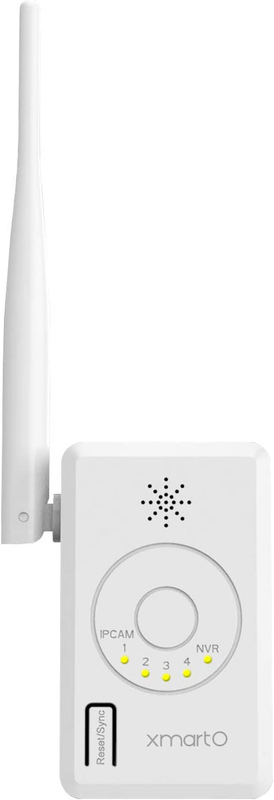
XMARTO RPT20 Wifi Security Camera Repeater/Range Extender - Works for
XMARTOUSD $32.51
Condition : New
Free Shipping
{{variant_type_name}} :

Notify me when the price drops
We will email you if we find a lower price on this product!
XMARTO RPT20 Wifi Security Camera Repeater/Range Extender - Works for XMARTO
Description Item Weight 8.4 ounces Item model number RPT20 Package Dimensions 8.54 x 4.06 x 2.52 inches Manufacturer xmartOThis is WiFi camera range extender/ repeater for xmartO WiFi NVR camera systems. By placing this repeater in the route between the NVR and cameras, it automatically connect those cameras with weak signals and relay to the NVR for stable connection. (Auto WiFi Relay works for G3 systems, manual WiFi relay for G2 systems). 【For All systems】Pair to NVR - bring the repeater close to the NVR, hold sync button for 10 seconds, repeater pairs to the NVR. When it's done, the 'NVR' LED stays on. (this is the basic step needed no matter what your system version is) 【For G3 camera systems】Place it for Auto WiFi Relay - if your system is G3 (NVR version 3.0.7+, camera version 3.2+), you simply bring this repeater and plug it somewhere in the route NVR to cameras. Within seconds it connects to NVR with 'NVR' LED stays on; within dozens of minutes it detects connection status of close-by cameras; then connects to weak-signal cameras and relay back to the NVR. If cameras have acceptable connections to the NVR itself, it will not change the connection status. 【For G2 camera systems】Manual setting for G2 camera systems (NVR version 2): if camera A has intermittent connection to NVR, plug the repeater to somewhere in the route from NVR to camera A, then go to Camera Manage - WiFi Relay, add camera A behind repeater. When you do this setting, the camera A needs good connection to NVR so it receives commands from the NVR. That means, if camera A was having poor connection to the NVR, you better to take it down to complete settings and then mount back. 【View connection status】In NVR's menu - Camera Manage - WiFi Relay, you can find the cameras' connection status. Make sure the Auto WiFi Relay is checked.
ABOUT US
We offer the best prices around on high quality products. Our E-store includes media such as books, movies, music and games while offering electronics, toys, sporting apparel, clothing, tools, general home, garden items and more.
SHIPPING
We are always working hard to ensure your package arrives as soon as possible. Please understand that some factors like weather, high postal traffic, and the performance of shipping companies are outside of our control.
We offer free shipping to the lower 48 states and ship within 2 business days of payment, usually sooner. We do not accept P.O. Boxes. Please provide a physical address.
RETURNS
We offer a 30-Day Return Policy on items which you are not completely satisfied with. You have the option for a full-refund or an exchange of the item. No returns are available on items shipped outside of the USA.
PAYMENT
We accept PayPal.
CONTACT US
This page content is yet to come
Please ad us to your favorite seller and visit again later
Thank You
CUSTOMER SATISFACTION
We try our very best to make sure every customer is completely satisfied. If there's a problem, message us! We're happy to help.
Description Item Weight 8.4 ounces Item model number RPT20 Package Dimensions 8.54 x 4.06 x 2.52 inches Manufacturer xmartO
ABOUT US
We offer the best prices around on high quality products. Our E-store includes media such as books, movies, music and games while offering electronics, toys, sporting apparel, clothing, tools, general home, garden items and more.
SHIPPING
We are always working hard to ensure your package arrives as soon as possible. Please understand that some factors like weather, high postal traffic, and the performance of shipping companies are outside of our control.
We offer free shipping to the lower 48 states and ship within 2 business days of payment, usually sooner. We do not accept P.O. Boxes. Please provide a physical address.
RETURNS
We offer a 30-Day Return Policy on items which you are not completely satisfied with. You have the option for a full-refund or an exchange of the item. No returns are available on items shipped outside of the USA.
PAYMENT
We accept PayPal.
CONTACT US
This page content is yet to come
Please ad us to your favorite seller and visit again later
Thank You
CUSTOMER SATISFACTION
We try our very best to make sure every customer is completely satisfied. If there's a problem, message us! We're happy to help.
Returns Accepted for this item if it's within 30 Days
Price type
IN STOCK
OUT STOCK




 .
.
